13 Intranet Applications for Backend Office Systems
Table of Contents
- Introduction
- Popular Intranet Platforms
- Pantheon Platform Deep Dive
- Orchard CMS Overview
- Comparative Analysis
- Conclusion
Introduction
Every company needs a backend-office system—whether it's an SCM (Supply Chain Management), ERP (Enterprise Resource Planning), or general intranet solution. Rather than building everything from scratch, leveraging existing platforms can save significant time and resources.
This guide provides a curated list of intranet platforms with various capabilities, tech stacks, and pricing models. You can choose to build custom solutions or start with pre-existing frameworks and customize them to fit your needs.
Popular Intranet Platforms
Below is a comprehensive list of 13 popular platforms for building intranet applications:
PHP-Based Solutions
- ExoPlatform - PHP
- OpenAtrium - PHP
- Pantheon - PHP (Hosted)
- Acquia Drupal 7 - PHP
ASP.NET Solutions
- Composite C1 - ASP.NET Razor, Web Forms, MVC
- BetterCMS - ASP.NET MVC Platform
- Kentico - ASP.NET Platform
- LeMoon - ASP.NET Platform
- MojoPortal - ASP.NET (Blogs, Forums, Calendar, Newsletter, Maps, eCommerce)
- MonoX - ASP.NET CMS and Social Networking Platform
- Orchard CMS - ASP.NET MVC (Open Source)
- Virto Commerce - .NET 4.5 (MVC, IoC, Entity Framework, Azure)
Enterprise Solutions
- SharePoint Online - Microsoft
Pantheon Platform Deep Dive
If you're starting a new system and want flexibility to customize while supporting multiple programming languages, Pantheon is highly recommended.
Key Features
- Foundation: Built on open-source OpenAtrium with essential modules for login, security, role management, and content management
- Free Tier: Try it out at no cost
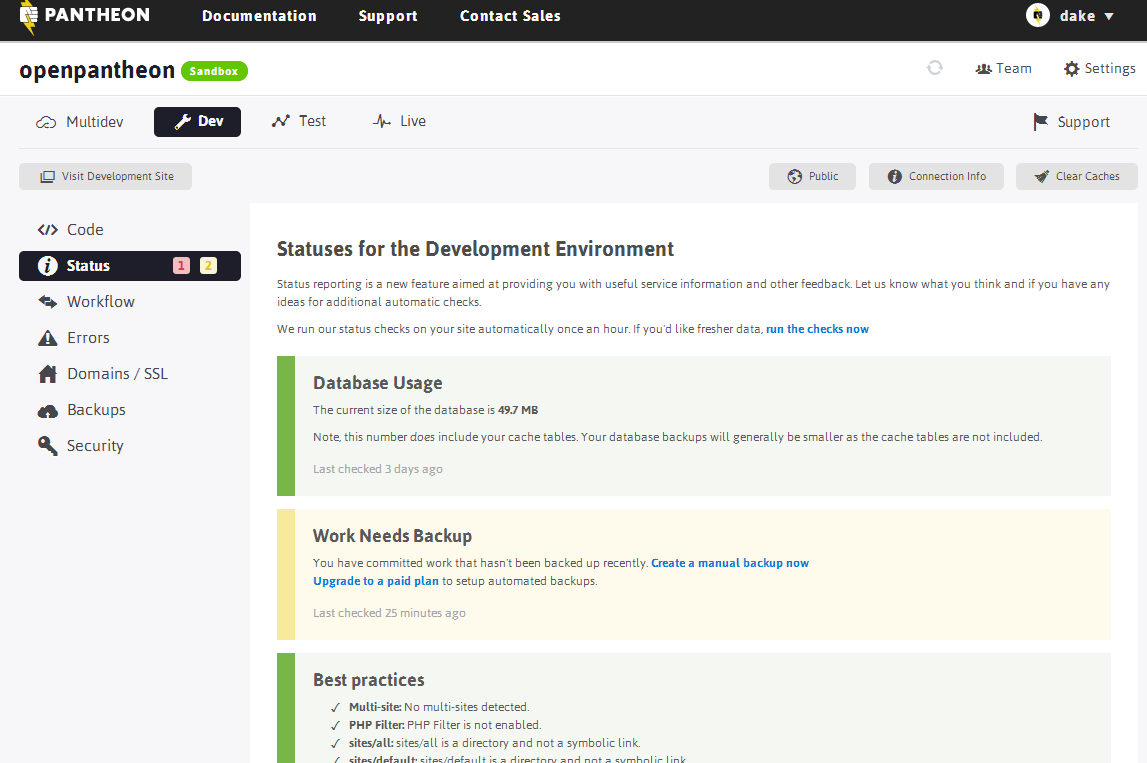
- Multi-Environment Support: Development (DEV), Testing (TEST), and Production (PROD) environments
- Deployment Options: Deploy code via SFTP or Git
- Data Management: Export databases and files easily
- Infrastructure: No need to manage web servers yourself
Why Choose Pantheon?
Pantheon accelerates development by handling infrastructure management while allowing you to focus on building features. If budget allows, you can launch quickly and manage an admin panel without extensive DevOps work.
Technology Stack: PHP-based with integrated hosting
Development Workflow Visualization
Pantheon provides a streamlined workflow across multiple environments:
Orchard CMS Overview
Orchard is an excellent choice for building intranet applications using the Microsoft tech stack.
Technology Stack
- Language: C#
- Framework: ASP.NET MVC
- Open Source: Free to use and modify
Strengths
- Similar architecture to OpenAtrium but with .NET ecosystem advantages
- Strong integration with Windows server environments
- Modular plugin architecture
- Extensive theming capabilities
Considerations
- Requires hosting on your own infrastructure
- Learning curve if unfamiliar with ASP.NET MVC
- Development and deployment setup required
Comparative Analysis
The following table compares three major platforms across key dimensions:
| Feature | OpenAtrium | Pantheon | SharePoint Online | Orchard CMS |
|---|---|---|---|---|
| Language | PHP + Apache | PHP + Apache | Microsoft | C# ASP.NET MVC |
| Features | Source code + modules | Hosted OpenAtrium | Social, Content Mgmt, Workflows, Work Management | Content Management |
| Setup Complexity | High (DIY) | Low (Managed Hosting) | Low (SaaS) | Medium (DIY) |
| Customization | Very Flexible | Very Flexible | Limited | Very Flexible |
| Infrastructure | Self-hosted | Managed | Cloud-hosted | Self-hosted |
| Price | Free | Pay-per-use | $5+/user/month | Free (base) |
Pros & Cons Breakdown
OpenAtrium
Pros:
- Excellent UI out of the box
- Extensive feature set
- Large community support
- PHP—most widely used web language
- Full application lifecycle management
- Completely free
Cons:
- Requires setup of entire development environment
- Infrastructure and server management needed
- Database and file management responsibility
- Longer deployment learning curve
Pantheon
Pros:
- All OpenAtrium advantages included
- Pre-configured DEV, TEST, PROD environments
- Ready-to-deploy hosting
- Git-based workflow integration
- Minimal infrastructure management
Cons:
- Requires subscription payment
- Limited free tier (3 sites)
- Vendor lock-in to Pantheon platform
SharePoint 2013 (On-Premises)
Pros:
- Rich customization capabilities
- Enterprise-grade features
- Extensive integration ecosystem
Cons:
- Requires dedicated server setup
- Expensive licensing costs
- Complex initial deployment
- Significant IT resources needed
SharePoint Online
Pros:
- Managed cloud service
- No server maintenance required
- Microsoft support included
Cons:
- High per-user costs ($5+/month minimum)
- Limited customization options
- Less flexibility for complex workflows
Orchard CMS
Pros:
- Clean architecture (similar to OpenAtrium)
- ASP.NET ecosystem integration
- Open source
- Modern C# language features
Cons:
- Requires self-hosting
- Smaller community than OpenAtrium
- Some advanced modules require payment
Choosing the Right Platform
For Maximum Flexibility with Minimal Cost
Choose: OpenAtrium
- Best if you have in-house development resources
- Ideal for teams comfortable with infrastructure management
For Rapid Deployment
Choose: Pantheon
- Best for teams wanting to launch quickly
- Ideal when you want managed hosting with customization
For Enterprise Environments
Choose: SharePoint
- Best for large organizations with existing Microsoft infrastructure
- Ideal when integration with Office 365 is needed
For .NET-Based Development
Choose: Orchard CMS
- Best for teams with C# expertise
- Ideal when you want open-source with .NET power
Conclusion
The choice of intranet platform depends on several factors:
- Budget: From free (OpenAtrium, Orchard) to enterprise licensing (SharePoint)
- Technical Resources: DIY platforms vs. managed hosting solutions
- Tech Stack: PHP, .NET, or cloud-native preference
- Timeline: Quick launch vs. custom-built solutions
- Scalability Needs: From small teams to enterprise organizations
There are numerous options available for building intranet systems. The comparison table above highlights the key differences between popular choices like OpenAtrium, Pantheon, and Orchard CMS. Consider your team's technical expertise, budget constraints, and long-term maintenance capabilities when making your decision.
Key Takeaway: Rather than starting from scratch, leveraging an existing platform with a strong community and proven track record will save you months of development time.