How to Get Started with Jest
2022/12/042 min read
bookmark this
Table of Contents
- Introduction
- Init NPM Repo and Setup Packages
- Add Test Script in package.json
- Add JavaScript and Test
- Run the Test
- Conclusion
Introduction
This blog shows how to quickly get started testing JavaScript with Jest.
Init NPM Repo and Setup Packages
Here we will set up the npm repo, then install the dependency package jest.
npm init -y
npm install --save-dev jest
Add Test Script in package.json
Add the test command with jest. Now if we run npm run test, it should run Jest with the default settings.
  "scripts": {
    "test": "jest"
  },
Add JavaScript and Test
Here, create a file and add a few JavaScript functions.
function sum(a, b) {
    return a + b;
}

function exponent(a,b) {
    return a ** b;
}

function subtraction(a, b) {
    return a -b;
}
module.exports = {
    sum,
    subtraction,
    exponent
};
Next, create a test file and add test code.
const {exponent, subtraction, sum} = require('../src/sample');

test('test sum', () => {
    expect(sum(1, 2)).toBe(3);
});

test('test subtraction', () => {
    expect(subtraction(10, 2)).toBe(8);
});

test('test exponent', () => {
    expect(exponent(5, 2)).toBe(25);
});
Run the Test
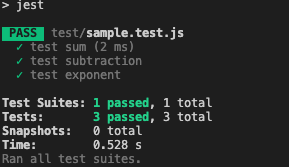
That's it! Now we can see the tests passed.
Conclusion
Setting up Jest for JavaScript testing is quick and simple. Initialize an npm project, install Jest as a dev dependency, add a test script, and write your test files. Jest handles the rest with its default configuration.